Branded Content Mix (Ratios)
To prevent fatigue and keep registrations organic, we maintain a balanced content ecosystem. Click each segment to view specific content examples and objectives.
Community Focus (40%)
Features local businesses joining, team spotlights (including highlighting that last year's teammates spanned ages 18 to 68! Emphasize that we want to be even more inclusive this year), volunteer features, sponsor appreciation, behind-the-scenes organizer preparation, and Wall of Warriors updates.
Dynamic CTA & Hashtag Helper
Use this tool to randomize your CTAs and keep posts feeling organic instead of repetitive.
Opening Campaign Sequence (3-Day Launch)
A three-day curiosity funnel designed to capture local attention before registrations go live.
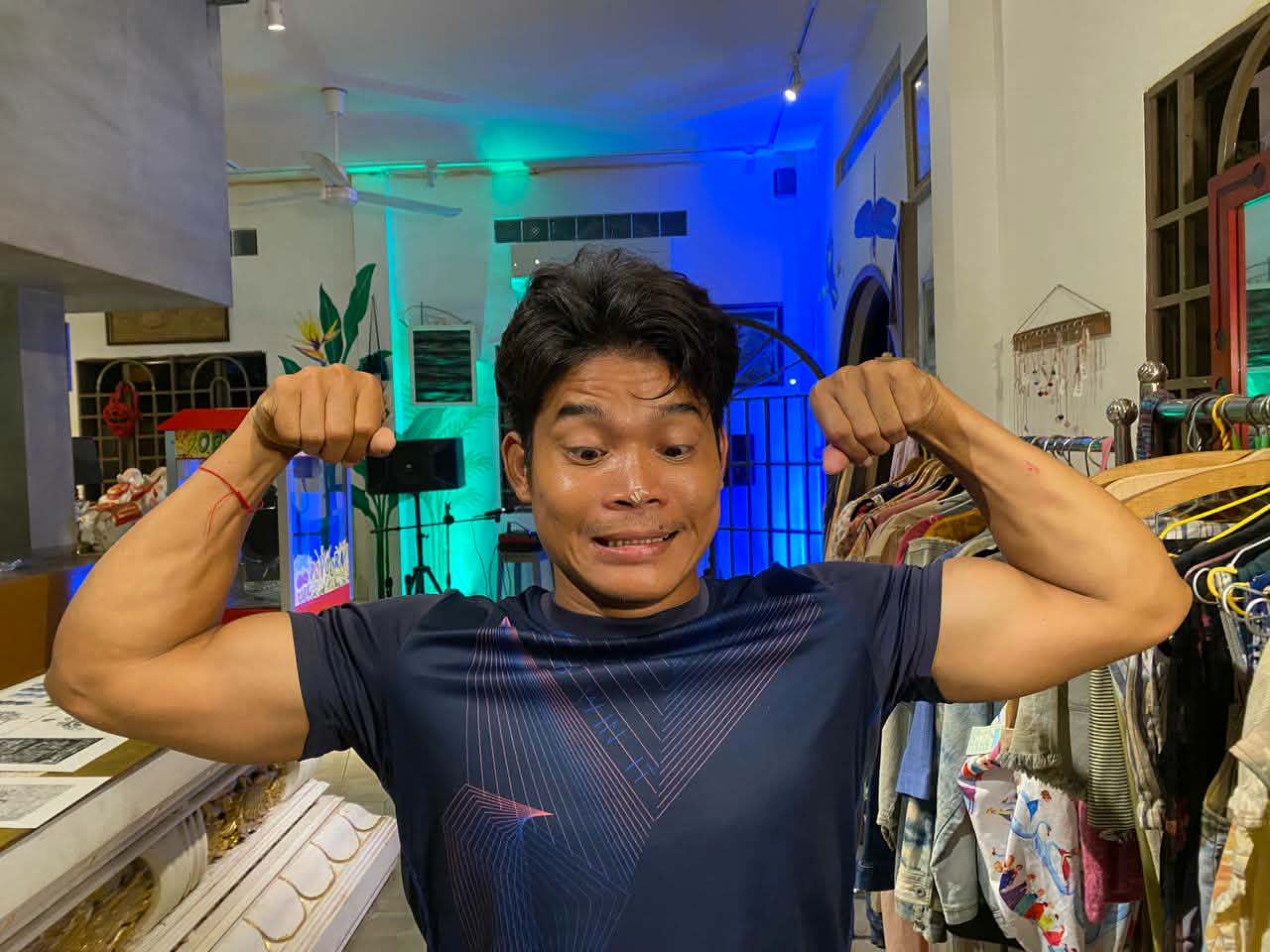
- Everyone drops only the portrait photograph of a team member with rice on their nose.
- No caption, no hashtags, no explanation, no logo.
- Pure curiosity drive.
- Teaser video featuring quick cuts of local participants.
- Ends with cinematic text: "ARE YOU READY?"
- Shows a huge cinematic lion which opens its mouth and makes a tiny "meow."
- Fade to black. No links.
- Official event details drop.
- Explains ROAR, Wake Park, dates, and ticket prices.
- Formally launches: "Every Drop of Sweat Is For Them."
- Link to registration wizard goes live.
ROAR 2026 Phase Roadmap
Our schedule transitions systematically across four key campaign phases leading up to the challenge.
Launch curiosity sequence, silent drops, and tiny lion teaser to spark community questions. Reveal registration logic on Day 3.
Introduce registered teams, local sponsors, volunteers, and local businesses. Keep tone optimistic while showing educational/meal statistics from ABCs & Rice.
Reveal land and water obstacles, training/fitness tips, and prize bag sponsor highlights ($50+ value). Focus messaging on generating fear-of-missing-out (FOMO).
Daily registration countdowns, practical announcements, logistical info. On race day, switch entirely to raw, unfiltered, live mobile-coverage of actions, starts, and finishes.
Note on Human Content (The Event Heartbeat):
Alongside the AI schedule, Matt or other organizers must post spontaneous updates (e.g., hitting 50 teams, photo/video from obstacle testing, T-shirt arrivals). Unpolished, raw photos inject authentic personality that automated scheduling cannot recreate.
Asset & Media Libraries
Access Google Drive folders containing raw media, logos, and images to use in the social media campaigns.
Silent photo drop portraits for Day 1 launch.
Official vectors and PNGs for sponsor appreciation posts.
Obstacle testing and fitness challenge reference media.
Official promotional videos, images, and marketing collateral.
Registrations & Payment Verification
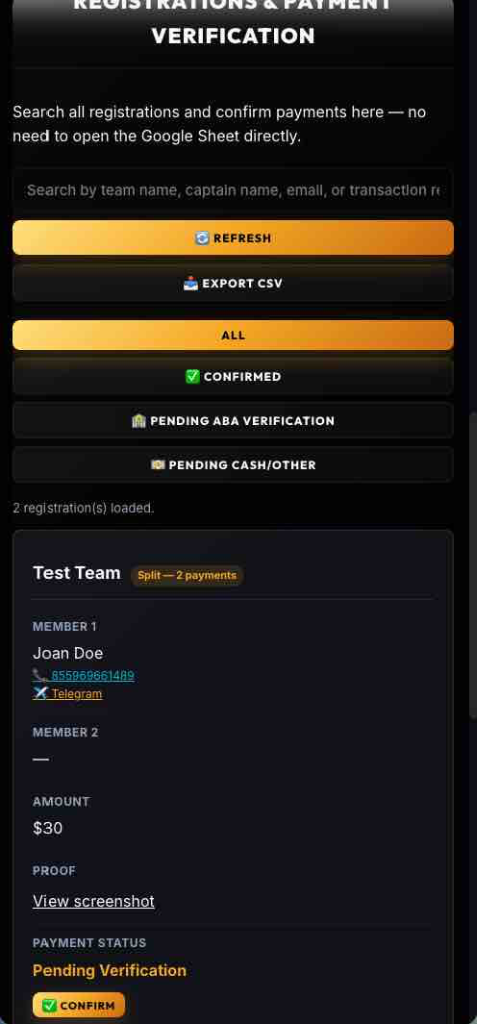
Search all registrations and confirm payments here — no need to open the Google Sheet directly.
| Team | Member 1 | Member 2 | Amount | Proof | Payment Status |
|---|---|---|---|---|---|
| Click Refresh to load registrations… | |||||
📖 Dashboard How-to-Use Guide
Quick reference guide for event organizers to verify payments, manage digital assets, and schedule promotional content.
1. Registrations & Payment Verification
All participant registrations flow here in real-time. Follow these steps to verify and confirm payments:
- Verify ABA Payments: Look at the screenshot preview under the Proof column, or click View screenshot. Cross-check the transaction number or reference code. If it matches your bank logs, click the gold Confirm button.
-
Manage Cash / Other Pending Payments: If the payment status shows "Reserved Cash Other Pending", the payment must be collected manually:
- Contact the participant directly by their listed phone number, or click the Telegram button to open a direct chat.
- Arrange to collect the cash payment.
- Once you receive the cash, click the gold Confirm button to verify their registration in the Sheet.
2. Digital Asset Drives
Access folders inside the Asset & Media Libraries tab:
- Sponsor Logos: Upload new sponsor logos to the Sponsor Logo Folder. They will be formatted and displayed on the website.
- October 18th Promo: Upload promotional videos, graphics, and teasers to the October 18 Promo Folder for upcoming marketing campaigns.
3. Social Media Post Scheduler (Buffer)
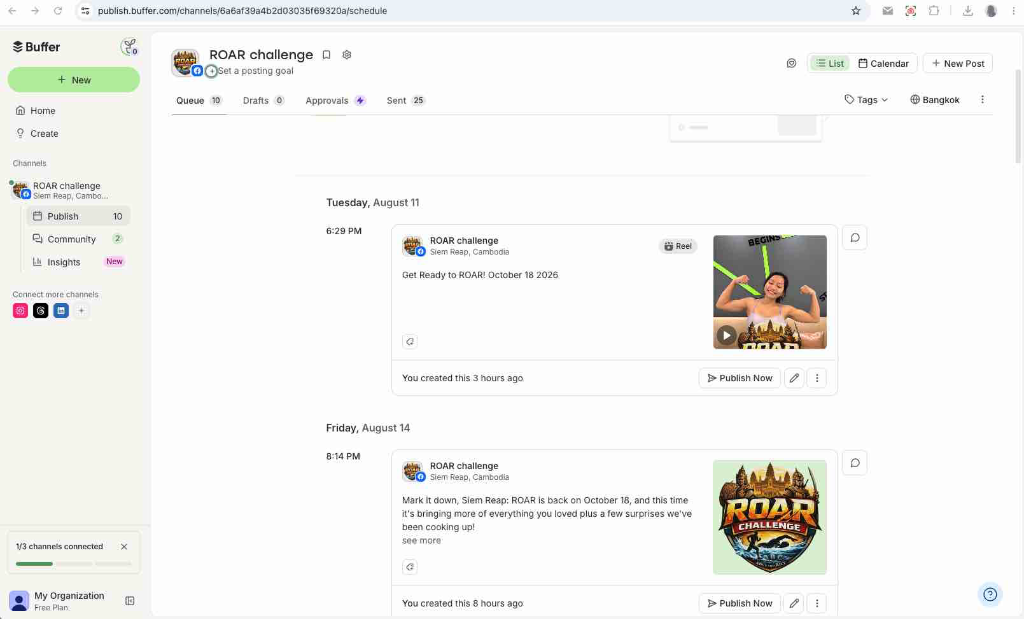
Pre-scheduled promotional posts are ready in the Buffer scheduler. To review or make changes:
- Open Buffer by clicking Open Post Scheduler using the credentials shown in the dashboard header.
- You will see all queued posts arranged in a timeline (shown in the preview below).
- To modify a post's text, update graphics, or change the release time, click the pencil edit mark (
✎) on the bottom right of the post card inside Buffer. Then click Save
ROAR Challenge — Liability Waiver & Release
Below is the current text of the liability waiver that registrants must review and agree to during registration (Step 3).